> ## Documentation Index
> Fetch the complete documentation index at: https://bun.manicule.dev/llms.txt
> Use this file to discover all available pages before exploring further.
> For every page in one file, fetch https://bun.manicule.dev/llms-full.txt (large).
> To search and read these docs as tools, connect the MCP server at https://bun.manicule.dev/api/mcp.
> Every agent surface: https://bun.manicule.dev/.well-known/llms-manifest.json
# Error Handling (/runtime/http/error-handling)
Related: [Server](/runtime/http/server.md), [Routing](/runtime/http/routing.md), [Cookies](/runtime/http/cookies.md), [TLS](/runtime/http/tls.md), [Metrics](/runtime/http/metrics.md)
> Learn how to handle errors in Bun's development server
To activate development mode, set `development: true`.
```ts title="server.ts" icon="/icons/typescript.svg"
Bun.serve({
development: true, // [!code ++]
fetch(req) {
throw new Error("woops!");
},
});
```
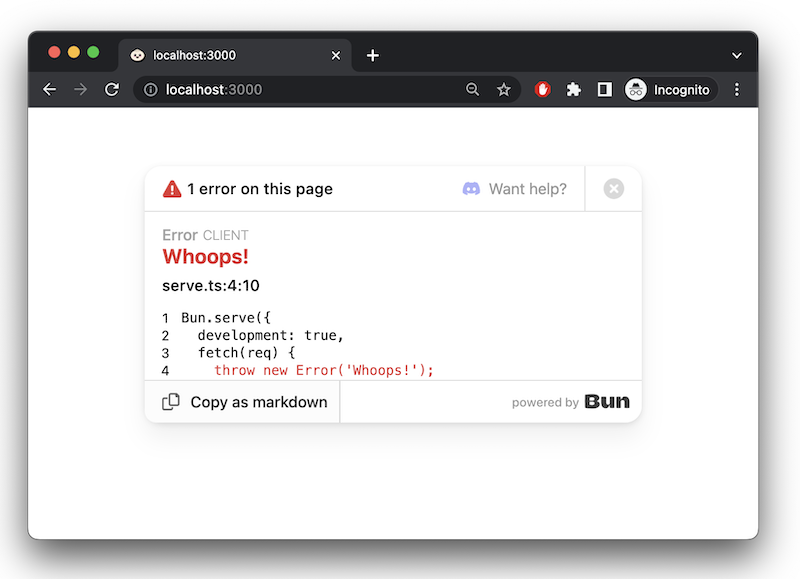
In development mode, Bun surfaces errors in-browser with a built-in error page.
### `error` callback
To handle server-side errors, implement an `error` handler. Return a `Response` to serve to the client when an error occurs. In `development` mode, this response replaces Bun's default error page.
```ts
Bun.serve({
fetch(req) {
throw new Error("woops!");
},
error(error) {
return new Response(`${error}\n${error.stack}`, {
headers: {
"Content-Type": "text/html",
},
});
},
});
```
[Learn more about debugging in Bun](/runtime/debugger)